
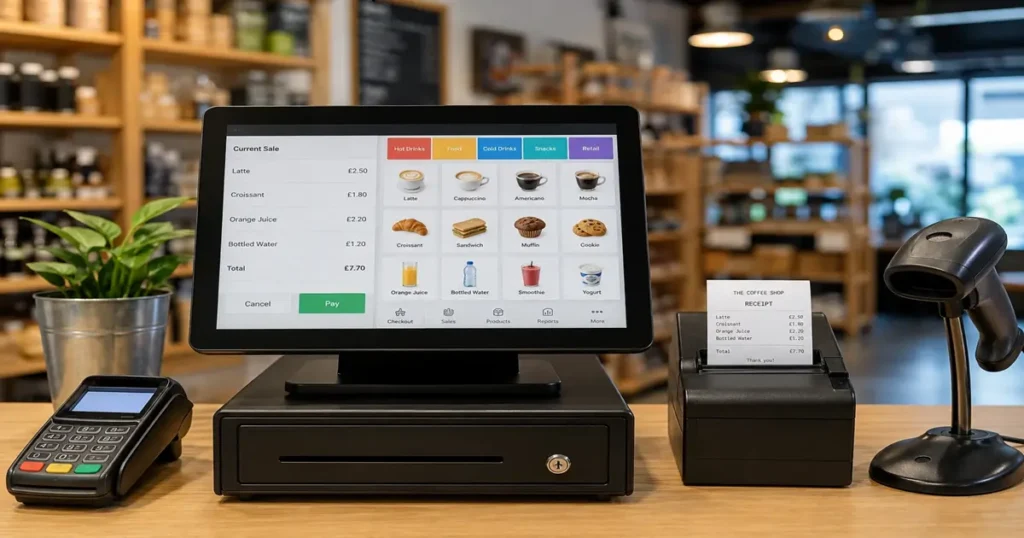
An EPOS (Electronic Point of Sale) system is a digital till that processes payments, tracks sales, and manages stock in real time. Used across retail, hospitality, and service businesses in the UK, EPOS systems replace traditional cash registers with software-driven tools that give business owners far greater control over their operations.
Running a business without clear visibility into your sales and stock is like driving without a dashboard. You might get where you’re going, but you’re taking unnecessary risks. That’s the problem EPOS systems solve, and why so many UK businesses, from independent shops to multi-site retailers, have made the switch.
This guide breaks down exactly what an EPOS system is, how it differs from a standard POS, how it works in retail settings, and what using one actually looks like day-to-day.
What Is the Difference Between EPOS and POS?
The terms are often used interchangeably, but they’re not quite the same thing.
A POS (Point of Sale) system refers broadly to any setup where a transaction takes place. Traditionally, that meant a cash register, a card reader, and perhaps a printed receipt. Functional, but limited.
An EPOS (Electronic Point of Sale) system goes several steps further. Rather than just processing a payment, an EPOS system captures transaction data, updates stock levels automatically, generates sales reports, and integrates with other business tools like accounting software or customer loyalty programmes.
Put simply: a POS records a sale. An EPOS system understands it and puts that information to work.
Most modern businesses in the UK now operate some form of EPOS, whether they know it by that name or not. Cloud-based platforms like Square, Lightspeed, and Epos Now have made the technology accessible to businesses of every size.
What Is an EPOS System in Business?
At its core, an EPOS system combines hardware and software to manage the commercial side of running a business.
The hardware side
A typical EPOS setup includes:
- A touchscreen terminal or tablet
- A barcode scanner
- A receipt printer
- A cash drawer
- A card payment reader
Some setups are compact, such as a tablet on a stand with an attached card reader. Others are more robust, with dedicated screens, back-office terminals, and integrated kitchen display systems for hospitality environments.
The software side
The software is where EPOS systems earn their value. Depending on the platform, business owners get access to:
- Real-time sales data: See exactly what’s selling, when, and at what margin
- Stock management: Automatic inventory updates every time a product is sold
- Staff management: Track hours, manage permissions, and monitor individual performance
- Customer data: Build profiles, track purchase history, and run loyalty schemes
- Reporting and analytics: Daily, weekly, and monthly breakdowns to inform decisions
For small business owners who previously relied on spreadsheets and gut instinct, this level of visibility is a significant upgrade.
Cloud-based vs. on-premise EPOS
Most modern EPOS systems in the UK are cloud-based, meaning data is stored remotely and accessible from any device with an internet connection. On-premise systems store data locally, which some businesses prefer for security or connectivity reasons, although cloud solutions have become the clear industry standard for flexibility and ease of use.
What Is an EPOS System in Retail?
Retail is where EPOS systems have had the most visible impact. Managing a product-based business without one creates real operational headaches, including stock discrepancies, slow checkouts, and little insight into which products are actually driving revenue.
Stock control in real time
Every time a product is scanned at the till, the EPOS system deducts it from the inventory count. When stock drops below a set threshold, some systems trigger automatic reorder alerts or even place supplier orders directly. For retailers managing hundreds or thousands of SKUs, this removes an enormous amount of manual work.
Faster, more accurate checkouts
Barcode scanning reduces human error and speeds up transactions. For a busy independent retailer or a market stall taking card payments, shaving a few seconds off each sale adds up quickly across a full trading day.
Multi-location management
Retailers with more than one site can manage stock, pricing, and staff across all locations from a single dashboard. If one branch runs low on a product that another has in surplus, the system flags it. That kind of visibility was once only available to large chains, but EPOS has made it accessible to growing independents too.
Integration with e-commerce
Many UK retailers now sell both in-store and online. Leading EPOS platforms integrate directly with e-commerce platforms like Shopify and WooCommerce, syncing stock levels across both channels automatically. Selling the last unit in-store? The online listing updates instantly.
How to Use an EPOS System: What Does the Day-to-Day Look Like?
Getting set up with an EPOS system is more straightforward than many business owners expect. Here’s a practical overview of how it works in practice.
Setting up your product catalogue
Before going live, you’ll upload your products, including names, prices, barcodes, and stock quantities, into the system. Most platforms offer bulk import via spreadsheet, so this doesn’t have to be done manually one item at a time.
Processing a sale
At the point of sale, a staff member scans items, applies any discounts, and takes payment via card, cash, or digital wallet. The system prints or emails a receipt, updates stock counts, and logs the transaction against that staff member’s record.
Running end-of-day reports
At the close of business, most EPOS systems generate a summary report covering total sales, payment method breakdowns, top-selling products, and refunds processed. This takes minutes to review and gives a clear picture of how the day performed.
Managing stock and reorders
With real-time inventory tracking, business owners can check stock levels at any point without physically counting shelves. Low-stock alerts mean you’re rarely caught off guard by running out of a popular item.
Training staff
Most cloud-based EPOS platforms are designed to be intuitive. Basic till operation can typically be learned in under an hour, and most providers offer onboarding support, tutorial videos, and customer service to help during the transition.
Is an EPOS System Worth It for a Small UK Business?
For most businesses that handle regular transactions, the answer is yes. The time saved on manual stock counts, the reduction in human error, and the quality of the reporting data generally outweigh the monthly subscription cost of a cloud-based system.
Entry-level EPOS software in the UK typically starts from around £20–£50 per month, with hardware costs varying depending on what you already have. Some providers offer free plans with limited features, which can work well for very small or low-volume businesses getting started.
The right choice depends on your transaction volume, number of locations, and whether you need e-commerce integration. A single-site café has very different needs from a multi-location retailer, and most EPOS providers offer tiered plans to accommodate both.
Frequently Asked Questions About EPOS Systems in the UK
What does EPOS stand for?
EPOS stands for Electronic Point of Sale. The term refers to digital systems that process transactions and collect sales and inventory data, replacing traditional manual tills.
Do small businesses in the UK need an EPOS system?
Not every small business needs a full EPOS setup, but most benefit from one. If you’re managing stock, running a team, or wanting clearer sales data, an EPOS system will save time and reduce errors.
What is the best EPOS system for retail in the UK?
Popular options in the UK include Square, Lightspeed, Epos Now, and Shopify POS. The best choice depends on your business size, budget, and whether you need e-commerce integration. Comparing free trials is the most reliable way to find the right fit.
Can an EPOS system work without the internet?
Some cloud-based EPOS systems offer an offline mode that continues processing transactions during an outage, syncing data once connectivity is restored. Check this feature before committing to a provider if your location has unreliable internet.
How long does it take to set up an EPOS system?
For most small businesses, a cloud-based EPOS system can be set up and operational within a day. Uploading a large product catalogue may take longer, but most providers offer import tools and onboarding support to speed up the process.

One Response